In customer production

From the first enquiry to the customer's signature — one thread.

Zinger Window & Door is workflow software for window and door businesses. Quoting, surveying, ordering, scheduling, site work and sign-off all live in one system, so nothing is re-keyed and nothing falls into the gap where sales hands over to operations.

The Zinger Window & Door app on a tablet, showing a property elevation with the quoted units placed
The customer journey

Six stages, one record.

Most window and door businesses run these stages across a quoting tool, a spreadsheet, a wall planner and a WhatsApp group. Here they are stages of the same job, so the detail captured at the enquiry is still there at handover.

  1. Enquiry

    Capture the lead with the detail that actually matters later — property, opening types, timelines.

  2. Quotation

    Price from the real specification, with revisions tracked rather than saved over the last version.

  3. Survey

    Confirm measurements on site, with photos attached to the job rather than sitting in someone's camera roll.

  4. Order

    Into production from the approved survey — no re-keying, and no transcription errors to find later.

  5. Schedule

    Allocate teams and fitters, with live status so the office can answer "when are you coming?" without a phone call.

  6. Sign-off

    The installer closes the job on site and the customer signs on the device, completing the record.

The morning view

Opens on what needs you today.

Not a wall of charts. The home screen is a short list of things that have gone past a date or are about to, drawn from across the whole system — fittings in the next seven days, material orders past their date, invoices overdue and due this week, quotes awaiting an answer, and leads to chase.

Alongside it, a feed of what actually happened — client answers, completed surveys, finished jobs, deliveries, and email that bounced so a silence isn't mistaken for a no.

The Zinger Window & Door home screen, listing clients without an email address, fittings in the next 7 days, overdue invoices, late material orders, leads to chase and quotes awaiting an answer
The home screen on a demo account.
Elevations

Show the customer their own house, with their own windows in it.

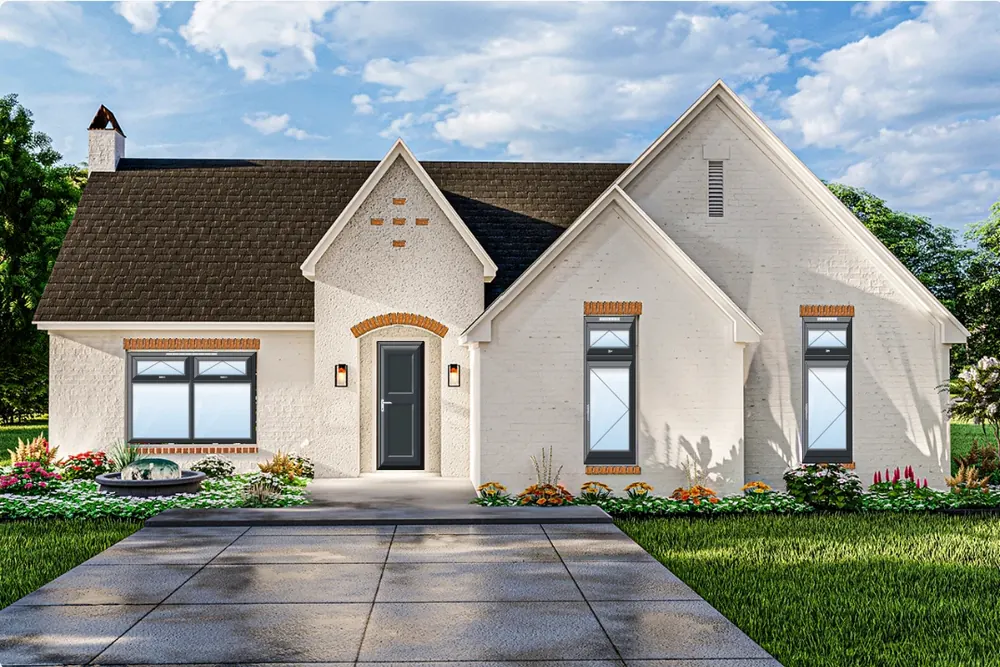
The hardest part of selling windows is that nobody can picture the result. Elevations closes that gap: drop the openings from the quotation straight onto a photograph of the property, and the customer sees exactly what they are buying before anything is ordered.

Before A house elevation as it stands, before the quoted windows and doors are placed
The property as it stands.
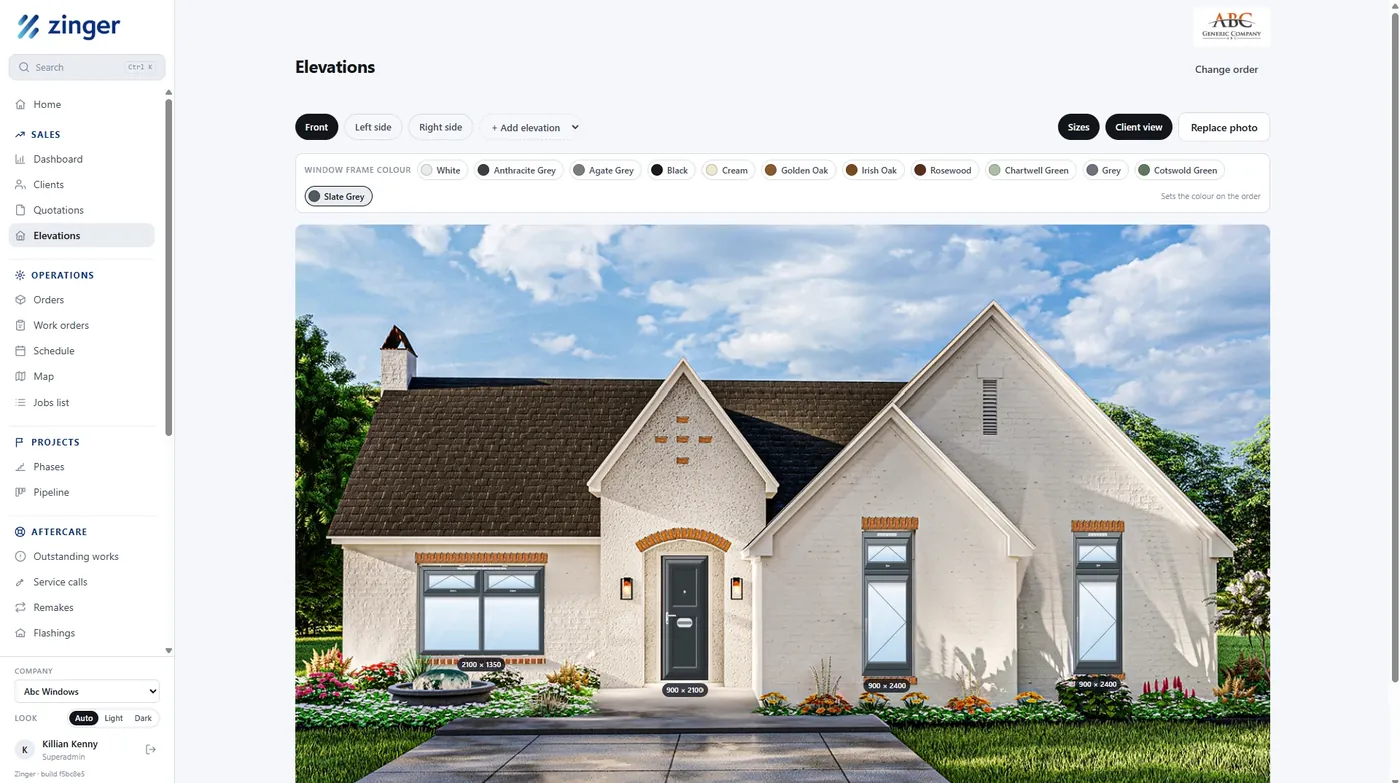
After The same elevation with the quoted windows and doors placed on it in the chosen frame colour
The quoted units, placed, in the colour chosen on the order.

Every opening, placed

The units on the quote become a checklist — lounge window, front door, hall window — each carrying its real size and configuration, like 2100 × 1350 with two top lights over fixed. Place them one by one and nothing is quietly left off.

Front, sides and gable

Add as many elevations as the property needs. Openings assigned to another face stay listed against it, so a patio door on the left side is not forgotten because the front is finished.

Colour chosen on the picture

Pick from the real frame range — anthracite grey, cream, golden oak, irish oak, rosewood, chartwell green, slate grey and the rest — and see it on the house. The choice writes straight back to the order, so the colour that was agreed is the colour that gets made.

A clean client view

One click strips the editing tools away and leaves the render on its own: their home, their units, their colour. It is a far better thing to sign off than a schedule of sizes.

The Zinger elevation designer: window frame colours across the top, and the quoted units placed on a photograph of the property with their sizes shown
The designer itself — the frame range across the top, the elevation for each face of the property, and every placed unit carrying the size it was quoted at.

A quotation's design carries across when the quote becomes an order — the work done to win the job is not redone to deliver it.

The schedule

Move a fitting, and the job moves with it.

A month of bookings across the whole team, coloured by fitter, with month, team and day views. Filter to fitting or service work, or down to one person's diary. Bank holidays and closed weeks are marked on the grid, so you can see what you are booking into.

The schedule for September 2026 on a demo account, a month grid of bookings coloured by fitter, with bank holidays and closed weeks marked
Click and drag to reschedule — here RC5002 moves from Friday the 18th to Monday the 21st.
The map

Where the work is, and who is covering it.

Every job pinned by location and coloured by the person assigned to it, behind the same filter as the schedule — so you can pull one fitter or service agent out and see their whole run laid out across the patch.

A map of the service area on a demo account, with jobs pinned across Cork and west Cork, each pin coloured by the fitter assigned to it
Open a pin for the job behind it — address, who is assigned and when. The client name and phone number are greyed out here.
Pipeline & phases

Every job sits in exactly one phase.

Initiate through to Closed, laid out as a board. Each column says how many jobs are in it and what they are worth; each card carries the job reference, the client, the fitting date and how far through its checklist it is. Filter the whole board down to one person's jobs with a tap.

The pipeline board on a demo account, with columns for Initiate, Survey, Material Order, Primary Fitting, Post Fitting and Closed, each showing a job count and a total value
A job moves across as its phase changes, and lands in Closed once the final payment is in.

A job moves when the work behind it is done.

Open a job and those six phases run down the side, ticked off as it goes, with the checklist for the phase it is in underneath.

  • Every phase carries its own checklist — Post Fitting covers flashings, ordering, snags and final payment
  • Finished items strike through, so what is left is what is left
  • An item can carry an action of its own, not just a tick — the final payment email goes from the job
  • And it can name who picks it up, so "final payment received" is flagged for Accounts
The Post Fitting checklist for job RC5023, with the six phases ticked off above it and every checklist item completed
Material orders

Every order dated back from the fitting.

A material order knows the job it belongs to and the day that job is being fitted. Work back through the supplier's lead time — 7 days, 21, 28 — and you have the last day the order can go out. Miss it and the date turns red while the order is still sitting there unplaced.

The material orders list on a demo account, showing order by, delivery and required by dates, the supplier lead time, line count, ready state and order status
Ready and ordered are separate columns on purpose — so “ordered” never gets read as “here”.
Paperwork

One record, every document.

The contract the customer signs, the job sheet the fitters carry and the order that goes to the supplier are all generated from the same job. They cannot disagree with each other, because there is nothing to keep in step.

The customer contract

Customer and installation addresses, surveyor comments, frame colour inside and out, handle colour and glazing. A window schedule naming every opening with its size, and a door specification that runs to the threshold, cylinder, hinge side, letterbox and numerals. Price, deposit and balance, with the conditions of sale and signature lines.

And the elevations — so what gets signed is a picture of their own house, not a list of dimensions.

The job sheet

What the fitting team takes to site: the team and their dates, every opening numbered with size, location, style and colour, and the full specification beneath it. Then two checklists that stop the expensive mistakes — what is happening on site (vents, child restrictors, window boards, rubbish, skip) and what the survey confirmed (large sizes checked, glazing confirmed, whether a crane or sucker is needed).

The supplier order

The same specification again, going out to the people who have to make it — so what is manufactured matches what was sold and what the fitters were told to expect.

The whole business

Six areas, one system.

Not a quoting tool with extras bolted on. The parts of a window and door business that normally live in separate systems are all here, sharing the same job record.

Sales

Clients, quotations and elevations — from first enquiry to an accepted quote with a design attached.

Operations

Orders, work orders, the schedule, a map of where the work is, and a jobs list that reflects reality.

Projects

Phases and pipeline, for the larger multi-stage jobs that do not fit a single install date.

Aftercare

Outstanding works, service calls, remakes and flashings — the follow-on work that usually falls off a spreadsheet.

Supply

Purchase orders, material orders, materials and suppliers, so a late delivery is visible before it becomes a missed fitting.

Finance

Invoices, reporting and a dashboard, closing the loop between the job done and the money in.

In their words

Built with a window and door business, not for a category.

“
They took the time to understand our business, our processes and the challenges involved in managing the customer journey — from the initial enquiry and quotation through surveying, ordering, installation and completion. The resulting platform has given us much greater visibility and control across our operations, with key information now available in one central location. We would have no hesitation in recommending Zinger.
William Irwin, Contracts DirectorWalsh Windows

Run a window and door business that deserves better software?

Tell us where the time goes today — the double entry, the chased surveys, the jobs nobody can find. If this fits, we'll show you it working.